
Close Menu
Ztoog
    What's Hot
    AI

    Bans on deepfakes take us only so far—here’s what we really need

    Science

    Will burying biomass underground curb climate change?

    Science

    The Looming El Niño Could Cost the World Trillions of Dollars

    Important Pages:
    • About Us
    • Contact us
    • Privacy Policy
    • Terms & Conditions
    Facebook X (Twitter) Instagram Pinterest
    Facebook X (Twitter) Instagram Pinterest
    Ztoog
    • Home
    • The Future

      What is Project Management? 5 Best Tools that You Can Try

      Operational excellence strategy and continuous improvement

      Hannah Fry: AI isn’t as powerful as we think

      FanDuel goes all in on responsible gaming push with new Play with a Plan campaign

      Gettyimages.com Is the Best Website on the Internet Right Now

    • Technology

      Iran war: How could it end?

      Democratic senators question CFTC staffing cuts in Chicago enforcement office

      Google’s Cloud AI lead on the three frontiers of model capability

      AMD agrees to backstop a $300M loan from Goldman Sachs for Crusoe to buy AMD AI chips, the first known case of AMD chips used as debt collateral (The Information)

      Productivity apps failed me when I needed them most

    • Gadgets

      macOS Tahoe 26.3.1 update will “upgrade” your M5’s CPU to new “super” cores

      Lenovo Shows Off a ThinkBook Modular AI PC Concept With Swappable Ports and Detachable Displays at MWC 2026

      POCO M8 Review: The Ultimate Budget Smartphone With Some Cons

      The Mission: Impossible of SSDs has arrived with a fingerprint lock

      6 Best Phones With Headphone Jacks (2026), Tested and Reviewed

    • Mobile

      Android’s March update is all about finding people, apps, and your missing bags

      Watch Xiaomi’s global launch event live here

      Our poll shows what buyers actually care about in new smartphones (Hint: it’s not AI)

      Is Strava down for you? You’re not alone

      The Motorola Razr FIFA World Cup 2026 Edition was literally just unveiled, and Verizon is already giving them away

    • Science

      Big Tech Signs White House Data Center Pledge With Good Optics and Little Substance

      Inside the best dark matter detector ever built

      NASA’s Artemis moon exploration programme is getting a major makeover

      Scientists crack the case of “screeching” Scotch tape

      Blue-faced, puffy-lipped monkey scores a rare conservation win

    • AI

      Online harassment is entering its AI era

      Meet NullClaw: The 678 KB Zig AI Agent Framework Running on 1 MB RAM and Booting in Two Milliseconds

      New method could increase LLM training efficiency | Ztoog

      The human work behind humanoid robots is being hidden

      NVIDIA Releases DreamDojo: An Open-Source Robot World Model Trained on 44,711 Hours of Real-World Human Video Data

    • Crypto

      Google paid startup Form Energy $1B for its massive 100-hour battery

      Ethereum Breakout Alert: Corrective Channel Flip Sparks Impulsive Wave

      Show Your ID Or No Deal

      Jane Street sued for alleged front-running trades that accelerated Terraform Labs meltdown

      Bitcoin Trades Below ETF Cost-Basis As MVRV Signals Mounting Pressure

    Ztoog
    Home » Corsair’s PC-dockable screen helped me monitor my PC components and news feeds
    Gadgets

    Corsair’s PC-dockable screen helped me monitor my PC components and news feeds

    Facebook Twitter Pinterest WhatsApp
    Corsair’s PC-dockable screen helped me monitor my PC components and news feeds
    Share
    Facebook Twitter LinkedIn Pinterest WhatsApp

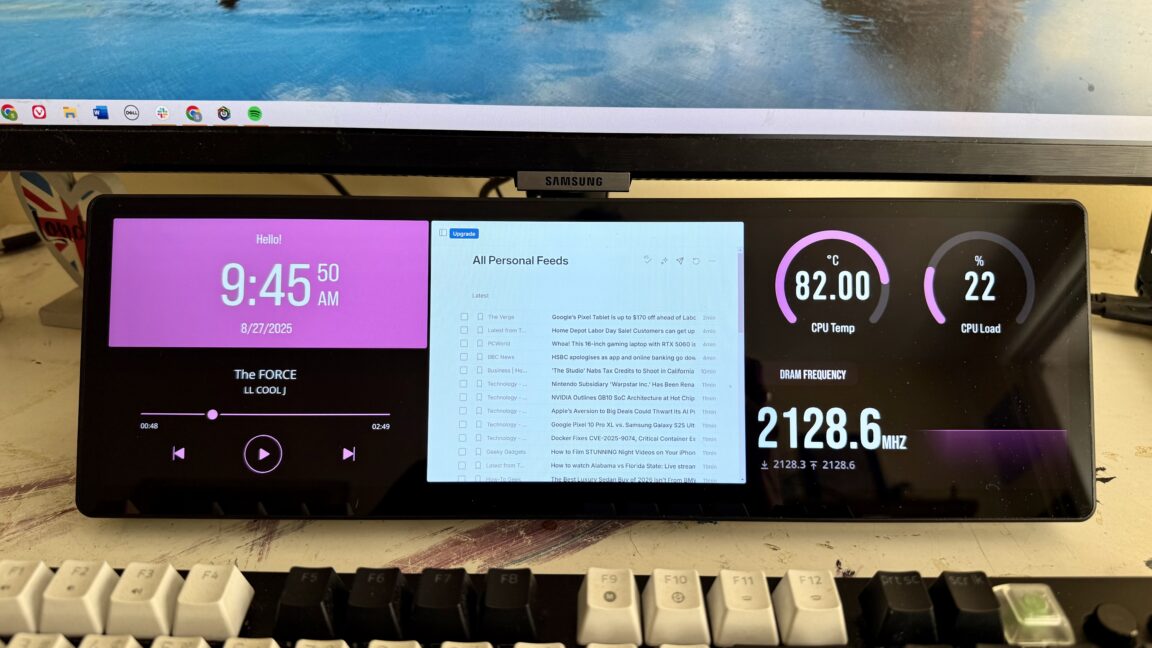
    Corsair’s rep told me that the company is currently “working on more features and widgets, so things should open up pretty soon.” He pointed to upcoming widgets for Discord, stocks, a virtual keyboard and mouse, and SimHub, plus a widget builder.

    I think most users will end up choosing between having the display typically run widgets or serving as a monitor. For Team Widget, there’s a handy feature where you can swipe left or right on the screen to quickly toggle different widget layouts that you’ve saved.

    As good as it gets, with room for improvement

    Corsair’s Xeneon Edge isn’t the only 14.5-inch touchscreen monitor out there, but it certainly has an edge over its nondescript rivals. The Xeneon Edge is more expensive than most of its competition. But during my testing with the display, I never felt like I was looking at something cheap. The IPS panel appeared bright, colorful, and legible, even in bright rooms and when displaying smaller text (very small text was still readable, but I’d prefer to read small lettering on something sharper).

    Many will completely forego Corsair’s widgets. They’ll miss out on some of what makes the Xeneon Edge expensive, but the display’s mounting options, solid build, and image quality, along with Corsair’s reputation, help it make sense over cheaper 14.5-inch touchscreens. Corsair gives the monitor a two-year limited warranty.

    Some might consider the software burdensome, but if you choose to use it, the app is modern and effective without making you jump through hoops to do things like adjust the monitor’s brightness, contrast, or sensor logging or set an image as the screen’s background.

    More widgets would help this monitor come closer to earning the $250 MSRP. But if you’re looking for a small, premium touchscreen to add to your desk—or mount to your PC—the Xeneon Edge is top of the line.

    Share. Facebook Twitter Pinterest LinkedIn WhatsApp

    Related Posts

    Gadgets

    macOS Tahoe 26.3.1 update will “upgrade” your M5’s CPU to new “super” cores

    Gadgets

    Lenovo Shows Off a ThinkBook Modular AI PC Concept With Swappable Ports and Detachable Displays at MWC 2026

    Gadgets

    POCO M8 Review: The Ultimate Budget Smartphone With Some Cons

    Gadgets

    The Mission: Impossible of SSDs has arrived with a fingerprint lock

    Gadgets

    6 Best Phones With Headphone Jacks (2026), Tested and Reviewed

    Gadgets

    5 changes to know about in Apple’s latest iOS, macOS, and iPadOS betas

    Gadgets

    Lenovo Unveils AI-Enhanced Legion Y700 (2026): A New Benchmark For Compact Gaming Tablets

    Gadgets

    ASUS Vivobook S16 OLED Review: The Most Practical 16-inch Laptop Right Now

    Leave A Reply Cancel Reply

    Follow Us
    • Facebook
    • Twitter
    • Pinterest
    • Instagram
    Top Posts
    Technology

    The Spigen Thin Fit is my favorite Apple Watch Series 8 case

    Kaitlyn Cimino / Android AuthorityWearables could also be boasting sturdiness stats left and proper, however…

    Crypto

    Robinhood acquires global crypto exchange Bitstamp for $200M

    Stock-trading app Robinhood is diving deeper into the cryptocurrency realm with the acquisition of crypto exchange Bitstamp.…

    Technology

    Fintech Kennek raises $12.5M seed round to digitize lending

    London-based fintech startup Kennek has raised $12.5 million in seed funding to broaden its lending…

    Technology

    Best TV Antenna for 2023

    $40 at Amazon Antennas Direct ClearStream Eclipse Best TV antenna for energy customers You could…

    Gadgets

    10 Best Grills (2023): Charcoal, Gas, Pellet, Hybrid, and Grilling Accessories

    Nothing says summer season like meals scorching on the grill. Here within the US and…

    Our Picks
    Crypto

    8 Best Cryptocurrency App Choices for Investors and Businesses

    The Future

    ChatGPT-5: release date, price, and what we know so far

    Technology

    Ukraine counteroffensive: Are the US and Ukraine at odds?

    Categories
    • AI (1,560)
    • Crypto (1,826)
    • Gadgets (1,870)
    • Mobile (1,910)
    • Science (1,939)
    • Technology (1,862)
    • The Future (1,716)
    Most Popular
    The Future

    Boost Mobile launches eSIM – Ausdroid

    Science

    The Steam Locomotive is Back, Although with an Eco-Friendly Twist

    Gadgets

    Google Search’s “udm=14” trick lets you kill AI search for good

    Ztoog
    Facebook X (Twitter) Instagram Pinterest
    • Home
    • About Us
    • Contact us
    • Privacy Policy
    • Terms & Conditions
    © 2026 Ztoog.

    Type above and press Enter to search. Press Esc to cancel.