Close Menu
Ztoog
    What's Hot
    The Future

    Proton Pass comes to Windows

    Mobile

    “Rumor has it”: The fine line between fact and fiction in mobile tech

    AI

    Meet GPT Crawler: An AI Tool that can Crawl a Site to Generate Knowledge Files to Create a Custom GPT from One or Multiple URLs

    Important Pages:
    • About Us
    • Contact us
    • Privacy Policy
    • Terms & Conditions
    Facebook X (Twitter) Instagram Pinterest
    Facebook X (Twitter) Instagram Pinterest
    Ztoog
    • Home
    • The Future

      What is Project Management? 5 Best Tools that You Can Try

      Operational excellence strategy and continuous improvement

      Hannah Fry: AI isn’t as powerful as we think

      FanDuel goes all in on responsible gaming push with new Play with a Plan campaign

      Gettyimages.com Is the Best Website on the Internet Right Now

    • Technology

      Iran war: How could it end?

      Democratic senators question CFTC staffing cuts in Chicago enforcement office

      Google’s Cloud AI lead on the three frontiers of model capability

      AMD agrees to backstop a $300M loan from Goldman Sachs for Crusoe to buy AMD AI chips, the first known case of AMD chips used as debt collateral (The Information)

      Productivity apps failed me when I needed them most

    • Gadgets

      macOS Tahoe 26.3.1 update will “upgrade” your M5’s CPU to new “super” cores

      Lenovo Shows Off a ThinkBook Modular AI PC Concept With Swappable Ports and Detachable Displays at MWC 2026

      POCO M8 Review: The Ultimate Budget Smartphone With Some Cons

      The Mission: Impossible of SSDs has arrived with a fingerprint lock

      6 Best Phones With Headphone Jacks (2026), Tested and Reviewed

    • Mobile

      Android’s March update is all about finding people, apps, and your missing bags

      Watch Xiaomi’s global launch event live here

      Our poll shows what buyers actually care about in new smartphones (Hint: it’s not AI)

      Is Strava down for you? You’re not alone

      The Motorola Razr FIFA World Cup 2026 Edition was literally just unveiled, and Verizon is already giving them away

    • Science

      Big Tech Signs White House Data Center Pledge With Good Optics and Little Substance

      Inside the best dark matter detector ever built

      NASA’s Artemis moon exploration programme is getting a major makeover

      Scientists crack the case of “screeching” Scotch tape

      Blue-faced, puffy-lipped monkey scores a rare conservation win

    • AI

      Online harassment is entering its AI era

      Meet NullClaw: The 678 KB Zig AI Agent Framework Running on 1 MB RAM and Booting in Two Milliseconds

      New method could increase LLM training efficiency | Ztoog

      The human work behind humanoid robots is being hidden

      NVIDIA Releases DreamDojo: An Open-Source Robot World Model Trained on 44,711 Hours of Real-World Human Video Data

    • Crypto

      SEC Vs. Justin Sun Case Ends In $10M Settlement

      Google paid startup Form Energy $1B for its massive 100-hour battery

      Ethereum Breakout Alert: Corrective Channel Flip Sparks Impulsive Wave

      Show Your ID Or No Deal

      Jane Street sued for alleged front-running trades that accelerated Terraform Labs meltdown

    Ztoog
    Home » I’ve used foldable phones for months — here are four software issues I noticed
    Mobile

    I’ve used foldable phones for months — here are four software issues I noticed

    Facebook Twitter Pinterest WhatsApp
    I’ve used foldable phones for months — here are four software issues I noticed
    Share
    Facebook Twitter LinkedIn Pinterest WhatsApp

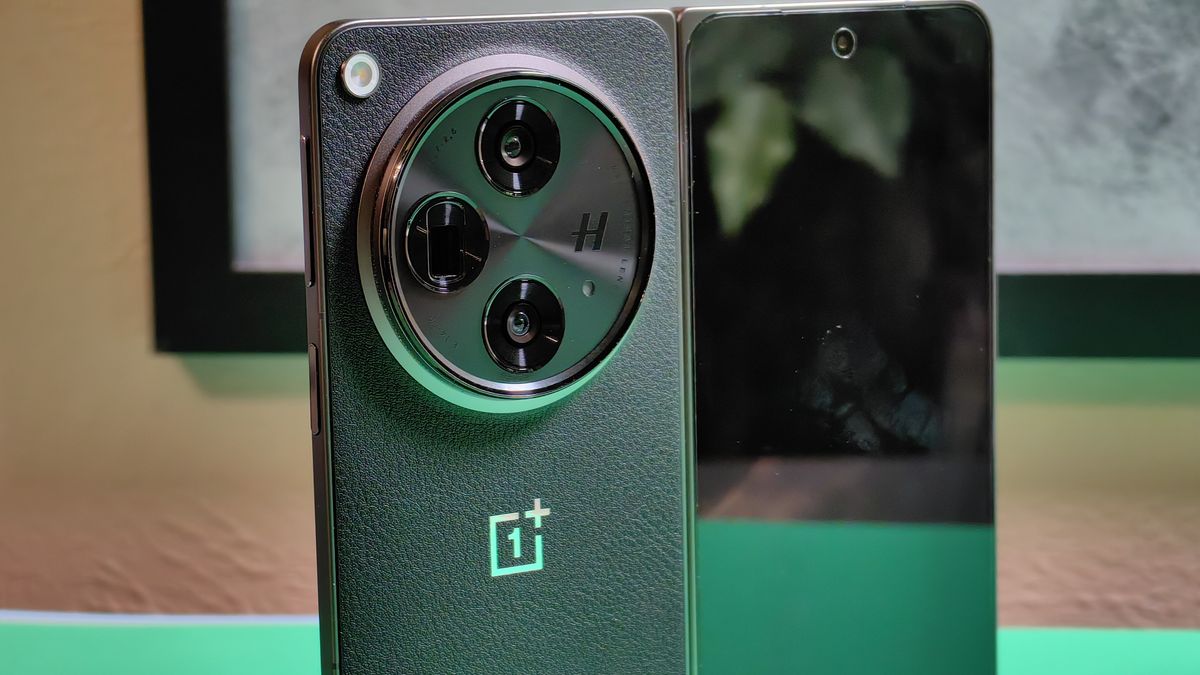
    I’ve been each day driving a book-style foldable telephone for the previous few months now, and I don’t need to return to a standard candybar telephone. Watching movies, studying manga, and shopping the online are all far more comfy to do on the internal display screen of a book-style foldable than on a candybar telephone. Unfortunately, my expertise with the software on the 2 book-style foldables I’ve used to this point — the Samsung Galaxy Z Fold 5 and the OnePlus Open — hasn’t been good, and it’s not due to something Samsung or OnePlus has performed.

    I’m certain you’ve heard reviewers say that many apps aren’t “optimized” but for foldables, however what precisely do they imply by that?  

    Left: OnePlus Open. Right: Google Pixel 8 Pro. (Image credit score: Mishaal Rahman / Android Central)

    Broadly talking, there are four classes of software issues that I’ve recognized whereas utilizing book-style foldable phones. These embrace measurement, structure, consciousness, and benefit. I’ll clarify what I imply by every of those and likewise speak about how Google and OEMs are working to handle them.

    My first subject: Size

    If you examine the variety of candybar Android phones that are in the marketplace versus the variety of large-screen Android gadgets (which incorporates tablets, foldables, and Chromebooks able to working Android apps), you’ll discover that the previous far exceeds the latter. That’s why it’s no shock that the overwhelming majority of builders concentrate on optimizing their Android apps for candybar phones first. If they’ve the time and assets, they might optimize their app for bigger screens, however many builders don’t.

    Developers that don’t or can’t optimize their apps have two choices: Block the app from working on gadgets with bigger screens or lock the app into portrait orientation. The first choice would shut out some potential customers, so many builders select not to try this. The second choice lets these customers entry the app, though they might should flip their machine 90° to truly use it. Apps like BeReal, Authy, Venmo, Zipcar, Lyft, Delta, Chase, and Amex lock themselves to portrait orientation, for instance.

    The Threads app in portrait orientation on the OnePlus Open

    By default, the Threads app is locked to portrait mode on the OnePlus Open.  (Image credit score: Mishaal Rahman / Android Central)

    It’s clearly not preferrred that there are so many apps that aren’t optimized for panorama orientation, however forcing builders to tweak their apps to assist what could also be a comparatively small variety of customers isn’t one thing Google can justify. Instead, Google discovered an answer that lets OEMs override an app’s orientation choice whereas nonetheless displaying the app in its meant side ratio.

    At a system degree, OEMs can override an app’s orientation choice, permitting them to be proven in panorama mode. By default, this locations the app in a letterbox surrounded by grey bars, however you’ll be able to stretch the app to fill the display screen if you’d like. In Samsung’s One UI, that is performed by going to Settings > Advanced options > Labs > Landscape view for portrait apps. In OxygenOS/ColorOS, that is performed by going to Settings > Main display screen > Display measurement. Finally, in inventory Android, that is performed by navigating to Settings > Apps > Aspect ratio.

    The Threads app in landscape mode on the OnePlus Open

    The Threads app compelled into panorama mode on the OnePlus Open. (Image credit score: Mishaal Rahman / Android Central)

    While overriding the orientation choice and side ratio of an app solves some issues, it results in different issues or just doesn’t deal with some present issues. These issues should do with the app’s structure. 

    My second subject: Layout

    By structure, I’m referring to the position of UI components inside an app, similar to buttons, tabs, textual content, and pictures. Many apps designed for candybar phones use a backside navigation bar, i.e., a row of buttons on the backside that lets customers navigate to completely different screens within the app. These buttons are shut sufficient collectively on candybar phones that they’re simple to achieve with out stretching your thumb, however they’re more durable to achieve when the app is stretched to fill the display screen on gadgets with a lot wider screens. The resolution to this drawback is for the app to modify to a facet navigation rail when it’s opened on a tool with a bigger display screen.

    Here are some screenshots exhibiting Gmail on a candybar telephone with a backside navigation bar, Gmail stretched to fill the display screen of a book-style foldable however with a backside navigation bar, and eventually, Gmail optimized for massive screens with a facet navigation rail:

    The Gmail navigation rail on a candybar smartphone and on a foldable

    Left to proper: Gmail on a candybar telephone kind issue with a backside navigation bar, Gmail stretched to fill the display screen of a book-style foldable however with a backside navigation bar, and Gmail optimized for massive screens with a facet navigation rail.  (Image credit score: Mishaal Rahman / Android Central)

    In-app navigation isn’t the one structure problem to contemplate. Book-style foldables, when unfolded, have sufficient display screen area to accommodate two panes of content material, but most apps solely present a single pane of content material at a time. Often, this ends in textual content and pictures being unnecessarily stretched to suit all the width of the internal show, similar to within the case of the X app.

    Creating a two-pane structure requires some work on the a part of the app developer, after all. Many Google apps, similar to Gmail, as proven above, have a two-pane structure, however most apps from different builders don’t. 

    Some OEMs have carried out options that pressure choose apps to open in a two-pane structure, however this solely works with apps which have a multiple-activity structure, because the system basically forces these apps to assist Android’s “activity embedding” function. However, these sorts of options should be particularly coded to assist sure apps, so that you’ll discover that one OEM’s OS can pressure a two-pane structure in a single app whereas one other OEM’s OS can not. A key instance of that is X, which may be compelled right into a two-pane structure on the Honor Magic V2 however not on the Samsung Galaxy Z Fold 5 or OnePlus Open. 

    LinkedIn app on the OnePlus Open

    The LinkedIn app compelled right into a two pane structure by OxygenOS (Settings > Main display screen > Dual Windows).  (Image credit score: Mishaal Rahman / Android Central)

    Stock Android, sadly, has no resolution to this drawback. Google’s reply is to supply builders the instruments they should create a two-pane structure, no matter whether or not their app follows fashionable Android growth (MAD) tips.

    Another layout-related subject is that, even when the app on paper does all the correct issues to assist large-screen gadgets, it doesn’t present customers that optimized structure by default. Those Gmail screenshots I shared earlier had been all taken on the OnePlus Open, first on the outer show, second on the internal show in its default portrait orientation, and lastly on the internal show when flipped over to panorama orientation. The OnePlus Open, in addition to the Galaxy Z Fold 5, has a a lot narrower internal display screen side ratio in comparison with the Google Pixel Fold, which implies its pure orientation when unfolded is portrait.

    This means you don’t should flip the telephone 90° to cope with portrait-locked apps, but it surely additionally implies that apps with a big display screen optimized structure, like Discord and Gmail, received’t present you that structure except you flip the telephone 90°.

    Image 1 of 2

    Using Discord in portrait orientation on the OnePlus Open
    Discord on the OnePlus Open when unfolded in its pure portrait orientation.(Image credit score: Mishaal Rahman / Android Central)
    Using Discord in landscape mode on the OnePlus Open
    Discord on the OnePlus Open when unfolded and flipped to panorama orientation.(Image credit score: Mishaal Rahman / Android Central)

    My third subject: Awareness

    This subsequent subject is much more minor in comparison with the earlier two, but it surely’s one thing that’s occurred to me typically sufficient that I must deliver it up. There are a couple of issues that apps must do to turn into “foldable aware,” and considered one of them is to deal with the change in show measurement that occurs when the consumer folds or unfolds their machine.

    Unfortunately, I’ve noticed that some apps, like Discord, don’t deal with this configuration change gracefully. For instance, I’ve typically discovered that the ship button is hidden off-screen when I fold the machine whereas Discord is open. To resurface this button, I have to shut out of the app after which reopen it. 

    Using Discord on the OnePlus Open external screen

    Discord’s ship button is typically hidden off display screen on the OnePlus Open when folding/unfolding the machine. This additionally occurs on the Galaxy Z Fold 5.  (Image credit score: Mishaal Rahman / Android Central)

    Many foldables even have a hinge angle sensor that apps can hearken to to regulate their UI primarily based on the folded state of the machine. Very few apps make the most of the hinge angle sensor, although. YouTube is one instance of an app that does. When the machine is half-opened, YouTube’s Premium controls are proven on the backside half of the display screen whereas the video is proven on the high half.

    My final subject: Advantage

    Speaking of apps making the most of options solely discovered on foldables, the final subject I needed to focus on is that only a few apps are making the most of the truth that foldables have two shows. The Pixel Fold’s Dual Screen Interpreter mode enables you to present translated textual content on the outer show and the unique textual content on the internal show. This function wasn’t accessible on the Pixel Fold at launch, nonetheless, because it depends on new capabilities launched in Android 14.

    Dual screen Interpreter mode on the Pixel Fold

    Dual Screen Interpreter Mode on the Pixel Fold.  (Image credit score: Google)

    Fortunately, Android 14 makes it attainable for different apps to make the most of each screens on a foldable, so hopefully extra apps get up to date to make the most of this distinctive side of foldable phones. 


    Book-style foldable phones tick all the correct packing containers for me, and regardless of these issues, I don’t see myself carrying a daily candybar telephone as my private machine anytime quickly. Once book-style foldables drop in worth and turn into extra mainstream, I’m hoping their elevated reputation will encourage builders to optimize their apps.

    Until then, in the event you’re seeking to choose up a book-style foldable just like the Galaxy Z Fold 5, Pixel Fold, or OnePlus Open, then try to be conscious of the issues I talked about on this article and the potential workarounds that are accessible or are in growth.

    Share. Facebook Twitter Pinterest LinkedIn WhatsApp

    Related Posts

    Mobile

    Android’s March update is all about finding people, apps, and your missing bags

    Mobile

    Watch Xiaomi’s global launch event live here

    Mobile

    Our poll shows what buyers actually care about in new smartphones (Hint: it’s not AI)

    Mobile

    Is Strava down for you? You’re not alone

    Mobile

    The Motorola Razr FIFA World Cup 2026 Edition was literally just unveiled, and Verizon is already giving them away

    Mobile

    Xiaomi Tag’s price surfaces – GSMArena.com news

    Mobile

    Galaxy S25 FE becomes even more affordable flagship killer with Amazon’s latest deal

    Mobile

    Gemini Labs arrives, giving a clear home for experimental features

    Leave A Reply Cancel Reply

    Follow Us
    • Facebook
    • Twitter
    • Pinterest
    • Instagram
    Top Posts
    The Future

    Nnedi Okorafor Exclusive Africanfuturist Excerpt: Like Thunder

    Nigerian American creator Nnedi Okorafor is a reputation fantasy followers are effectively acquainted with—she’s received…

    Technology

    Free Technology for Teachers: Keep, Books, and Canva

    Good morning from Maine the place it is overcast and drizzly, once more. It has…

    Gadgets

    The best power bank for camping in 2023, tested and reviewed

    We could earn income from the merchandise out there on this web page and take…

    Science

    Newfound moon around asteroid Dinkinesh is actually two touching rocks

    The asteroid Dinkinesh and its binary contact satellite tv for pcNASA/Goddard/SwRI/Johns Hopkins APL The asteroid…

    Technology

    Seven ClassTools Templates to Try This Year

    ClassTools has lengthy been a favourite useful resource of mine for creating all types of…

    Our Picks
    AI

    Laying the foundation for data- and AI-led growth

    The Future

    Armies of bots battled on Twitter over Chinese spy balloon incident

    Technology

    No apologies as Reddit halfheartedly tries to repair ties with moderators

    Categories
    • AI (1,560)
    • Crypto (1,827)
    • Gadgets (1,870)
    • Mobile (1,910)
    • Science (1,939)
    • Technology (1,862)
    • The Future (1,716)
    Most Popular
    The Future

    I leapt onto Leaptel and I’m happy I did

    Crypto

    Bitcoin Price Crashes Below $26,000 As SEC Pushes Back On 7 Spot ETF Filings

    Science

    This Homemade AI Drone Software Finds People When Search and Rescue Teams Can’t

    Ztoog
    Facebook X (Twitter) Instagram Pinterest
    • Home
    • About Us
    • Contact us
    • Privacy Policy
    • Terms & Conditions
    © 2026 Ztoog.

    Type above and press Enter to search. Press Esc to cancel.