Close Menu
Ztoog
    What's Hot
    Science

    Quantum lidar could help driverless vehicles spot bright objects

    Mobile

    Samsung unveils Galaxy Book6 series laptops with Intel’s latest 18A processors

    Technology

    Phone Keyboard Exploits Leave 1 Billion Users Exposed

    Important Pages:
    • About Us
    • Contact us
    • Privacy Policy
    • Terms & Conditions
    Facebook X (Twitter) Instagram Pinterest
    Facebook X (Twitter) Instagram Pinterest
    Ztoog
    • Home
    • The Future

      What is Project Management? 5 Best Tools that You Can Try

      Operational excellence strategy and continuous improvement

      Hannah Fry: AI isn’t as powerful as we think

      FanDuel goes all in on responsible gaming push with new Play with a Plan campaign

      Gettyimages.com Is the Best Website on the Internet Right Now

    • Technology

      Iran war: How could it end?

      Democratic senators question CFTC staffing cuts in Chicago enforcement office

      Google’s Cloud AI lead on the three frontiers of model capability

      AMD agrees to backstop a $300M loan from Goldman Sachs for Crusoe to buy AMD AI chips, the first known case of AMD chips used as debt collateral (The Information)

      Productivity apps failed me when I needed them most

    • Gadgets

      macOS Tahoe 26.3.1 update will “upgrade” your M5’s CPU to new “super” cores

      Lenovo Shows Off a ThinkBook Modular AI PC Concept With Swappable Ports and Detachable Displays at MWC 2026

      POCO M8 Review: The Ultimate Budget Smartphone With Some Cons

      The Mission: Impossible of SSDs has arrived with a fingerprint lock

      6 Best Phones With Headphone Jacks (2026), Tested and Reviewed

    • Mobile

      Android’s March update is all about finding people, apps, and your missing bags

      Watch Xiaomi’s global launch event live here

      Our poll shows what buyers actually care about in new smartphones (Hint: it’s not AI)

      Is Strava down for you? You’re not alone

      The Motorola Razr FIFA World Cup 2026 Edition was literally just unveiled, and Verizon is already giving them away

    • Science

      Big Tech Signs White House Data Center Pledge With Good Optics and Little Substance

      Inside the best dark matter detector ever built

      NASA’s Artemis moon exploration programme is getting a major makeover

      Scientists crack the case of “screeching” Scotch tape

      Blue-faced, puffy-lipped monkey scores a rare conservation win

    • AI

      Online harassment is entering its AI era

      Meet NullClaw: The 678 KB Zig AI Agent Framework Running on 1 MB RAM and Booting in Two Milliseconds

      New method could increase LLM training efficiency | Ztoog

      The human work behind humanoid robots is being hidden

      NVIDIA Releases DreamDojo: An Open-Source Robot World Model Trained on 44,711 Hours of Real-World Human Video Data

    • Crypto

      SEC Vs. Justin Sun Case Ends In $10M Settlement

      Google paid startup Form Energy $1B for its massive 100-hour battery

      Ethereum Breakout Alert: Corrective Channel Flip Sparks Impulsive Wave

      Show Your ID Or No Deal

      Jane Street sued for alleged front-running trades that accelerated Terraform Labs meltdown

    Ztoog
    Home » Windows Notepad’s midlife renaissance continues with spellcheck and autocorrect
    Gadgets

    Windows Notepad’s midlife renaissance continues with spellcheck and autocorrect

    Facebook Twitter Pinterest WhatsApp
    Windows Notepad’s midlife renaissance continues with spellcheck and autocorrect
    Share
    Facebook Twitter LinkedIn Pinterest WhatsApp

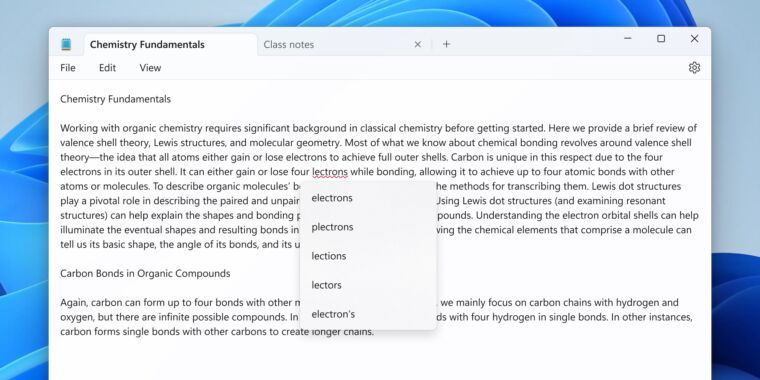
    Enlarge / “Notepad.exe however with spellcheck” appears to be like just about precisely such as you’d count on it to.

    Microsoft

    Whatever else you may say about Windows 11—and no matter you consider its pushy tendencies and the Copilot function that has been rolled out to just about everybody regardless of being labeled a “preview”—the working system has ushered in a little bit of a renaissance for decades-old built-in apps like Paint and Notepad.

    Notepad’s improvement specifically has been putting; it had gotten small under-the-hood updates over time, however in some ways, the model that was nonetheless in Windows 11 at launch in 2021 was the identical app that Microsoft shipped with Windows XP, Windows 95, Windows 3.1, and even Windows 1.0.

    An up to date model of Notepad at the moment rolling out to Windows Insiders within the Canary and Dev channels is including two extra fashionable options to the previous app: spellcheck and autocorrect. Per traditional, spellcheck in Notepad highlights misspellings with pink squiggly underlines, and right-clicking the phrase or urgent Shift + F10 will pop up a brief menu of steered fixes.

    Recognizing that Notepad is commonly used to view or edit log or config information, Microsoft says that spellcheck “is off by default in log information and different file sorts sometimes related with coding.” Spellcheck may be enabled or disabled for any given file sort (or for particular person information) in Notepad’s settings. Individual phrases will also be ignored in that doc or added to your dictionary in order that they’ll all the time be ignored in each doc you open.

    Advertisement

    If you are upgrading from the Windows 10 model of Notepad, the spellcheck and autocorrect options be a part of the tabbed interface, redesigned Settings display screen, an auto-resume function, and a handful of different tips that the app has discovered all through Windows 11’s improvement.

    Notepad continues to be properly in need of turning into a wealthy textual content editor, however there’s room for it to select up just a few extra fundamental textual content and doc modifying options since Microsoft formally killed off WordPad in a latest Windows 11 replace. Unlike Notepad, WordPad had been largely left alone since a Windows 7-era refresh that added a person interface ribbon just like the one within the (then-current) Office 2007 replace. For free-of-charge wealthy textual content modifying, Microsoft pushes customers towards the web model of Microsoft Word as an alternative.

    Microsoft is at the moment testing Windows 11 24H2 within the Canary and Dev Windows Insider channels, a preview of this fall’s main replace that can mark the working system’s third anniversary. Updates to Notepad and different apps might roll out earlier than then, although, in holding with Microsoft’s “launch them after they’re prepared” strategy to function additions within the Windows 11 period.

    Windows Insiders additionally bought some new Paint options earlier this month; Microsoft tweaked the best way the comb dimension selector works and has added the choice to designate one among your picture layers because the background layer. Wonders by no means stop.

    Share. Facebook Twitter Pinterest LinkedIn WhatsApp

    Related Posts

    Gadgets

    macOS Tahoe 26.3.1 update will “upgrade” your M5’s CPU to new “super” cores

    Gadgets

    Lenovo Shows Off a ThinkBook Modular AI PC Concept With Swappable Ports and Detachable Displays at MWC 2026

    Gadgets

    POCO M8 Review: The Ultimate Budget Smartphone With Some Cons

    Gadgets

    The Mission: Impossible of SSDs has arrived with a fingerprint lock

    Gadgets

    6 Best Phones With Headphone Jacks (2026), Tested and Reviewed

    Gadgets

    5 changes to know about in Apple’s latest iOS, macOS, and iPadOS betas

    Gadgets

    Lenovo Unveils AI-Enhanced Legion Y700 (2026): A New Benchmark For Compact Gaming Tablets

    Gadgets

    ASUS Vivobook S16 OLED Review: The Most Practical 16-inch Laptop Right Now

    Leave A Reply Cancel Reply

    Follow Us
    • Facebook
    • Twitter
    • Pinterest
    • Instagram
    Top Posts
    Gadgets

    Unity CEO John Riccitiello is retiring, effective immediately

    Enlarge / Former Unity CEO John Riccitiello.Unity John Riccitiello, CEO of Unity, the corporate whose…

    Gadgets

    The best cheap fitness trackers in 2023

    We could earn income from the merchandise obtainable on this web page and take part…

    Crypto

    Bitcoin Trades Below ETF Cost-Basis As MVRV Signals Mounting Pressure

    The center of January marked the continuation of an already struggling value motion for Bitcoin,…

    The Future

    Supreme Court sends social media regulation laws back to lower courts

    The U.S. Supreme Court has referred two state laws designed to regulate social media platforms…

    AI

    New method could increase LLM training efficiency | Ztoog

    Reasoning giant language fashions (LLMs) are designed to unravel advanced issues by breaking them down…

    Our Picks
    Technology

    The One UI 7 beta could be right around the corner for your Samsung phone

    Mobile

    Costco offering Apple AirTag 4-Pack at just $64.99

    The Future

    5 Best Virtual Business Phone Systems for Small Teams and Businesses

    Categories
    • AI (1,560)
    • Crypto (1,827)
    • Gadgets (1,870)
    • Mobile (1,910)
    • Science (1,939)
    • Technology (1,862)
    • The Future (1,716)
    Most Popular
    Gadgets

    15 Best Black Friday Coffee Deals (2023): Fellow Gear, Coffee Beans, Espresso Machines

    Technology

    Intel CEO claims 18A node will at least match TSMC’s N2 performance and beat it to market

    Mobile

    The best Apple Watch Series 8 screen protectors

    Ztoog
    Facebook X (Twitter) Instagram Pinterest
    • Home
    • About Us
    • Contact us
    • Privacy Policy
    • Terms & Conditions
    © 2026 Ztoog.

    Type above and press Enter to search. Press Esc to cancel.